What Is Fancy Cafe AI? The Scene and Trend Explained
What is Fancy Cafe AI? Understand the first-time café scene, the two character roles, how photo-based remakes work, and the current service availability.
Last updated: 2026-11-03
Fancy cafe AI refers to using personal photos to recast the “POV: Your first time in a fancy cafe” comedy scene. A visitor sits on a small wall-mounted table, mistaking it for a seat. An arriving companion uses the furniture correctly, and the visitor realizes the mistake. The scene is recognizable because the setting and actions stay familiar while the cast changes.
On this website, you can watch the complete reference scene and choose photos for the two roles locally. A new model is still being evaluated. Video generation and payments are not open yet. The intended generated video is 21 seconds; the reference sample is not proof of a generated result.
What happens in the first-time café scene?
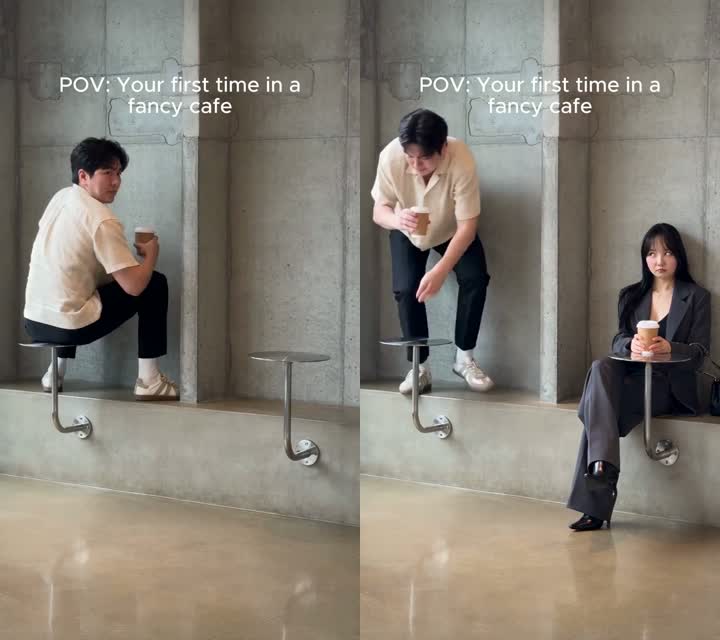
The setup and the realization, shown in frames from the supplied reference. These are not personalized AI results.
The joke has three parts. First, the visitor confidently balances on a small round metal table, holding a coffee. The minimalist concrete room and unusual furniture make the choice look plausible. Then another person enters, sits on the low ledge, and places a drink on a matching table. Finally, the visitor looks over, understands, and changes seats.
You do not need a caption explaining every movement. The contrast between the two guests carries the reveal. That is why keeping the furniture, entrance, and reaction visible matters more than adding elaborate backgrounds or visual effects. Watch the reference scene on the homepage to follow the full setup and ending.
Who are the left and right people?
The left person is the first visitor, already sitting on the table when the scene begins. The right person is the companion who arrives and uses the low seat correctly. These labels identify positions in the reference, rather than gender or a relationship between the people.
Choose the role that fits your idea. You might put yourself in the mistaken visitor’s place, put a friend in the companion’s role, or prepare separate photos for both. Permission matters for either role. Our current local selector lets you inspect those assignments, but it does not change the actors in the video player.
How does a photo become part of a video?
Photo-guided video systems use images to guide appearance and a reference clip to guide movement or composition. This differs from simply placing a still portrait over an existing video: a model must handle changing expressions, hands, body position, and moments when one person partly covers another.
For example, fal’s Kling Motion Control documentation describes using an image for appearance and a video for action. That is an example of the technology category, not a statement that this site currently uses Kling. We are evaluating the model and workflow before opening generation.
Is this a template, a face swap, or a new scene?
Those terms describe different approaches. An editing template arranges existing material. A face swap changes facial identity while trying to keep the source footage. A reference-guided generation system can reconstruct more of the person and scene. The finished experience may combine image editing, motion transfer, audio processing, and video delivery.
The name “fancy cafe AI” alone does not tell you which approach a website uses. Check whether its sample is original reference footage or a personalized result, whether its preview is an image or a video, and whether it discloses an active generation service. On this site, the sample and local photo selector are explicitly labeled.
What can you do here today?
You can watch the supplied reference, hear its source audio through the player, and choose one or two photos in your browser. The local selector accepts JPG, PNG, and WebP up to 10 MB per file. Selecting a photo does not upload it, run a model, or create an order.
For the distinction between free exploration and paid video packs, read Is Fancy Cafe AI free?. For photo preparation and a future output review checklist, follow the complete Fancy Cafe AI guide. Only use photos of yourself or other adults who agree to participate; see our acceptable use policy.
Frequently asked questions
What is Fancy Cafe AI?
Fancy Cafe AI is a photo-based concept for recasting the “first time in a fancy cafe” scene. One guest mistakes a small table for a seat; a companion arrives and reveals the mistake. This site currently offers a reference video and local photo selection; generation is not open.
Which person plays which role?
The left person is the first visitor, sitting on the small table. The right person is the arriving companion who sits on the low ledge and uses the table for a drink. You can select a photo for either role or both in the local preview.
Is Fancy Cafe AI the same as a café image generator?
No. The intended output is a moving, two-person café scene with a setup and reveal. A café image generator makes a still picture. The local photo selection on this site is not a generated image or video.